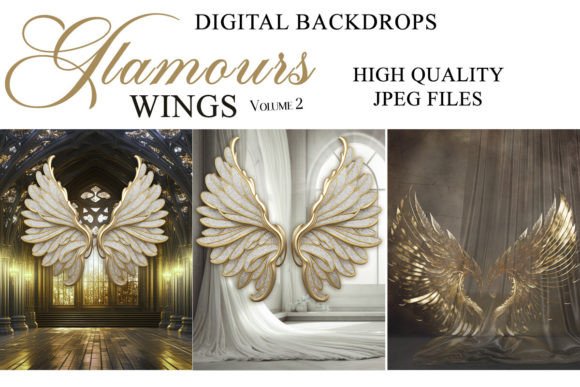
Elevate Your Photography with Glamours Wings V2
There's a moment in every photographer's workflow where a good image becomes a great one. It often happens in post-production, when the raw potential of a portrait is unlocked with the right environment. This is where Glamours Wings V2 Digital Backgrounds enter the picture, offering a versatile toolkit for any creative looking to add depth, drama, or ethereal beauty to their work. These aren't just static images; they are layered foundations for storytelling, designed for seamless integration into your favorite editing software.
Understanding the Core Appeal
At its heart, Glamours Wings V2 is a collection of high-quality digital backdrops engineered for composite photography and photo manipulation. The visual language here leans into the glamorous and fantastical—think soft, luminous textures, intricate wing motifs, and rich, atmospheric tones that can range from deep jewel hues to soft pastels. The personality is one of elegance and transformation. Whether you're aiming for a fairy-tale portrait, a dramatic fashion shot, or a whimsical family photo, these backdrops provide a consistent, professional-grade canvas.
The practical appeal is undeniable. Delivered as 8" x 10" (3000 × 2400 px) JPEG files at 300dpi, they are built for serious output. This resolution ensures crisp prints for portfolios, gallery walls, or client deliverables. The true power, however, lies in their compatibility. They function flawlessly as layers in Adobe Photoshop, Photoshop Elements, GIMP, Paint Shop Pro, and even web-based editors like PicMonkey. For those using Lightroom, an ON1 plugin integration bridges the gap. This broad compatibility means you're not locked into a single expensive ecosystem; you can use the tools you already own and understand.
Where Creativity Takes Flight: Practical Applications
The real-world value of a design asset like this is measured by its utility across projects. For the professional photographer, Glamours Wings V2 is a time-saver and a creative catalyst. Imagine a studio session where you can't get the perfect cloudy sky or a specific textured wall. Instead of reshooting, you can composite your subject onto a digital backdrop that matches your lighting setup, achieving a polished, magazine-ready result. The backdrops work exceptionally well for portrait photography, senior portraits, maternity shoots, and creative family sessions.
Beyond the studio, the applications extend into the broader creative economy. Small business owners and entrepreneurs can leverage these backgrounds to create striking product photography for e-commerce sites or social media. A handmade jewelry line or artisan cosmetics brand gains instant sophistication when photographed against a layered, textured digital environment. Bloggers and content creators can use them to design unique featured images for articles or eye-catching thumbnails for video content, ensuring visual consistency that strengthens brand recognition.
For designers and marketers, the backdrops serve as a foundational element in larger design assets. They can be used to create mood boards, client presentation mockups, or the background layer for social media graphics and digital ads. The fantasy and glamour themes are particularly effective for brands in the beauty, fashion, entertainment, and lifestyle sectors, helping to build a brand identity that feels aspirational and immersive.
Integrating Backdrops into Your Workflow
Success with digital backdrops hinges on thoughtful integration. The most critical step happens before you even open your editing software: plan your composition. Consider the direction of light in your original photograph. If your subject is lit from the left, choose or adjust a backdrop where the primary light source or highlight aligns. This simple act of matching directional lighting is what separates a believable composite from an obvious cut-out.
When evaluating fit, think about narrative. Does the backdrop's mood support the story of your portrait? A serene, misty forest scene will tell a different story than a vibrant, bokeh-filled cityscape. Test the backdrop with a low-opacity layer first to see how the colors and tones interact with your subject's skin tones and clothing. Use layer masks and soft brushes to blend edges seamlessly, and don't be afraid to use adjustment layers (like Curves, Hue/Saturation, or Color Balance) to perfectly match the color grading between your subject and the new environment.
For those building a personal brand or a commercial photography business, consistency is key. Using a cohesive set of backdrops across a series of images—like for a specific marketing campaign or a portfolio collection—creates a recognizable style. This visual consistency reinforces professionalism and makes your work more memorable to clients and audiences.
A Final Note on Execution
While the technical specs are robust, the artistry comes from you. Treat Glamours Wings V2 not as a magic filter, but as a versatile component in your creative toolkit. Experiment with opacity, blending modes (like Multiply, Screen, or Overlay), and subtle transformations to make each backdrop uniquely yours. The goal is to enhance your subject, not overshadow it. By focusing on thoughtful composition and seamless integration, you transform these digital files from simple backgrounds into powerful storytelling elements that elevate the entire visual experience.